Best tool for sending business reports as email

  • imagine slide

    Do you want to save time and effort for your business?

    IknowAlerter...

  • imagine slide

    Do you want to make faster and better decisions?

    IknowAlerter...

  • imagine slide

    Do you want to have access to your data in real-time?

    IknowAlerter...

What is IknowAlerter ?


Are you tired of spending hours running reports from your ERP and then interpreting the data?

Have you ever wondered if there's a more efficient alternative to the tiresome routine of running and manually checking ERP reports?

Have you ever thought that there might be a more efficient solution for receiving personalized alerts with important data from BI?

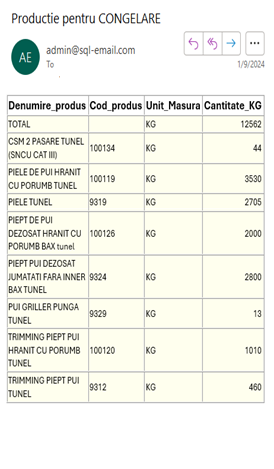
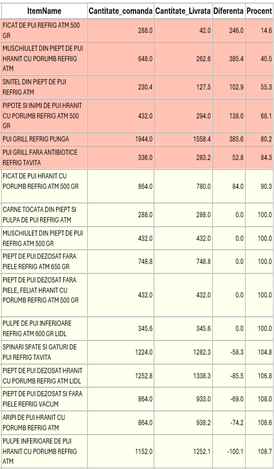
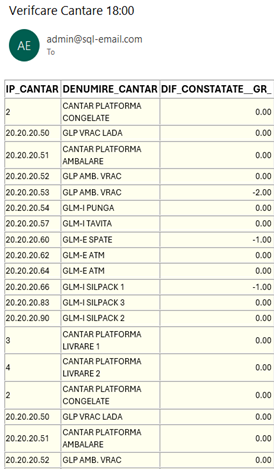
IknowAlerter is the best tool for sending real-time HTML formatted emails directly from your ERP, CRM etc database.
This tool is intended for managers, business users, DBAs, developers. For everyone!

The application connects to your database, then configures the queries it will transmit, sets the interval at which it will send this data (from interval to interval (every hour, etc.), daily, weekly, monthly, etc.) and the list of recipients for each report, and takes care of the rest.

Redefine the alerts

Sending customized reports from your ERP, CRM database via email has never been easier.

Less code

No need to write additional code, just query the database and your HTML formatted report is ready.

Built-in scheduled task

By using this tool, you no longer need anything else to send scheduled alerts (daily, weekly, monthly, interval-based, etc.). This sets us apart from the competition.

telefon

Conditional formatting

The rows that meet the condition set by the user are colored differently.

Development

We are working to develop more cool features. Check the News section to see what's new.

24/7 Live Support

We are here for our customers, you can contact us anytime and we will do our best to solve your issues."

Setup ODBC connection

Configure SMTP (email)

Write the queries

Receive emails

Our Team


This section is where we showcase the talented individuals who make up our organization. Here, you'll find a diverse group of professionals dedicated to our mission and values. Get to know the faces behind our brand, their expertise, and their commitment to excellence. From leadership to every team member, we're united in our passion for serving our customers and achieving our goals. Explore this section to learn more about the people driving our success and shaping our future..

With over two decades of experience in the IT industry since 2001, Viorel is a trusted professional in software development. Specializing in databases and ERP consultancy, he brings extensive expertise and unwavering passion for advanced technological solutions. He founded Idealogic Software in 2021. If you want to find out more about him, please visit the website https://www.it-specialist.org .

Databases 98%
Software integration 96%
ERP Consultant 95%
Business 90%

With a results-oriented mindset and a constant desire for self-improvement, Marilena is dedicated to bringing significant value to every project she's involved in. By adapting to technological changes and fostering strong relationships with clients and colleagues, she demonstrates a firm commitment to excellence and innovation.

Programming 92%
Training 98%
Integration 95%
Business 85%

Costi is a passionate software developer with a strong background in the field. With meticulous attention to detail and remarkable problem-solving abilities, he brings valuable contributions to every project he is involved in. With extensive expertise in various programming languages and modern technologies, Costi is an indispensable member of our team, delivering innovative and efficient solutions to any challenge encountered.

.NET 97%
Web development 92%
Databases 93%
Business 87%

Anca is a dynamic and creative marketing professional with a proven track record in driving successful marketing campaigns. With a keen eye for consumer trends and market insights, she develops innovative strategies to elevate brand visibility and engage target audiences effectively. Armed with a comprehensive understanding of digital marketing tools and traditional marketing techniques, Anca is dedicated to delivering impactful results and driving business growth.

Marketing 97%
Photoshop 92%
Training 90%
Business 89%

IknowAlerter Roadmap

From conception to launch and beyond, the journey of a software application is a complex and captivating one. It begins with analysis and defining requirements, where development teams work together to shape the vision and goals of the project. Next, the design and development process comes into action, turning concepts into tangible code and features. The next stage is testing and revision, where the application undergoes rigorous testing to ensure its performance and reliability. User feedback and subsequent adjustments are crucial to enhancing the user experience and functionality of the application. Finally, comes the moment of launch, where the application sees the light of day and is made available to users. However, the journey doesn't end here. Continuous improvements, security updates, and responding to user feedback are essential to keeping the application relevant and competitive in the long run. The journey of a software application is a dynamic and iterative process, fueled by collaboration, innovation, and a commitment to providing an exceptional user experience.

Today

  • New version with a lot of improvements.

    The application has been rewritten in .NET 6, using the DevExpress framework, and includes numerous enhancements that you can discover by downloading the application.

  • Send differentiated emails.

    The recipient list can be uploaded from a field in the resulting table after the query, thus, depending on the result, the email can be sent only to certain addresses.

  • Excel file attached

    In addition to the formatted HTML table, an Excel file can also be attached to the transmitted email.

  • Conditional color formatting

    The rows that meet the condition set by the user are colored differently.

2018

  • First improvement

    In the full version, after 10 seconds of inactivity from the launch of the application, it automatically enters alert sending mode.

  • IknowAlerter was released

    In this day, the first version of the application was officially launched.

Gallery


Explore our world in images! Our gallery provides a visual journey into our unique experiences. Navigate through our diverse collection of images to inspire and connect with our story. Whether you're seeking inspiration, information, or simply to learn from images, our photo gallery welcomes you to enjoy each picture and join our journey.

aplicatie proprie

IknowAlerter application.

In these photographs, you can see the IknowAlerter application with all its functionalities and the results of running the application.

aplicatie proprie

IknowAlerter application

In these photographs, you can see the IknowAlerter application with all its functionalities and the results of running the application.

aplicatie proprie

IknowAlerter application

In these photographs, you can see the IknowAlerter application with all its functionalities and the results of running the application.

aplicatie proprie

IknowAlerter application

In these photographs, you can see the IknowAlerter application with all its functionalities and the results of running the application.

aplicatie proprie

IknowAlerter application

In these photographs, you can see the IknowAlerter application with all its functionalities and the results of running the application.

aplicatie proprie

IknowAlerter application

In these photographs, you can see the IknowAlerter application with all its functionalities and the results of running the application.

Pricing


Explore our options and find the right solution for your needs. With our "Pricing" section, you can quickly access information about our available rates and packages. Whether you're looking for basic services or customized solutions, we offer a variety of options to meet your requirements. Browse our pricing list to learn more about what we offer and find the best solution for you. If you have any questions or need assistance, feel free to contact us.

  • 0
  • Free

    OEM license

    Limited customer support

  • 3 tasks

  • No scheduled alerts

  • Send emails manually

  • Non comercial

  • Download
  • 150
  • PayPal

    OEM license

    Customer Support

  • Unlimited tasks

  • Scheduled alerts

  • Send emails automatically

  • Commercial use

  • PayPal
  • 150
  • Credit card

    OEM license

    Customer Support

  • Unlimited tasks

  • Scheduled alerts

  • Send emails automatically

  • Commercial use

  • Buy online
  • 150
  • Wire transfer

    OEM license

    Customer Support

  • Unlimited tasks

  • Scheduled alerts

  • Send emails automatically

  • Commercial use

  • Contact us

* After you make the payment, please send me your OEM serial at admin@sql-email.com
* As soon as I receive your email, I'll send you the activation code (usually within a few hours).

** The license is OEM, the price is for one machine for an unlimited period.

Happy Clients

Documentation


Explore our documentation resources to find answers to your questions and learn more about our products and services. In our documentation section, you'll find guides, tutorials, and other helpful information to help you make the most of our experience. Watch the videos below to learn more about how to install and configure IknowAlerter. If you have any further questions or need assistance, our team is always here to help.

Download IknowAlerter and setup ODBC connection

by admin | April 4, 2024

For the better understanding of "SQL Server connection module" is recommended to learn more about SQL connection string. please visit : https://www.connectionstrings.com/sql-server-native-client-11-0-odbc-driver/ Next step is to download SQL Native Client (for MSSQL - 32 or 64 bits version depending on you computer operating system) or other ODBC driver

Watch tutorial

Setup SMTP (email) connection

by admin | April 4, 2024

In this module are settings of your email server. You can ask your provider for this settings. Auth. type has a tooltip where you can see the possible values and SSL is strongly recommended. User and password must be specified and are your email user and password. You can send a test email to your address and if all settings are correct you can save the data.

Watch tutorial

Create a new query and run a scheduled task

by admin | April 4, 2024

Deleted task cannot be recovered, so it's recommended to back-up you TASKS.XML file (in this file are stored your tasks). In "Scheduled mode" IknowAlerter it will be minimized in tray and only in this mode it will send automatically emails. "Save" it will save your task and it will be displayed in the tasks list. "Run now" will send an email without regard the "Occurs" settings.

Watch tutorial

Download IknowAlerter and setup ODBC connection

by admin | April 4, 2024

For the better understanding of "SQL Server connection module" is recommended to learn more about SQL connection string. please visit : https://www.connectionstrings.com/sql-server-native-client-11-0-odbc-driver/ Next step is to download SQL Native Client (for MSSQL - 32 or 64 bits version depending on you computer operating system) or other ODBC driver

Watch tutorial

Setup SMTP (email) connection

by admin | April 4, 2024

In this module are settings of your email server. You can ask your provider for this settings. Auth. type has a tooltip where you can see the possible values and SSL is strongly recommended. User and password must be specified and are your email user and password. You can send a test email to your address and if all settings are correct you can save the data.

Watch tutorial

Create a new query and run a scheduled task

by admin | April 4, 2024

Deleted task cannot be recovered, so it's recommended to back-up you TASKS.XML file (in this file are stored your tasks). In "Scheduled mode" IknowAlerter it will be minimized in tray and only in this mode it will send automatically emails. "Save" it will save your task and it will be displayed in the tasks list. "Run now" will send an email without regard the "Occurs" settings.

Watch tutorial

header

Contact Us


Do you have any questions, suggestions, or feedback? We'd love to hear from you! Our team is dedicated to providing excellent customer service and is here to assist you with any inquiries you may have. Feel free to reach out to us using the contact information provided below. Whether you prefer to give us a call, send us an email, or fill out the contact form, we're committed to responding promptly and addressing your needs. We value your input and strive to make your experience with us as seamless and enjoyable as possible. Don't hesitate to get in touch – we're here to help!

header

+40 756 500 005

header

37 , St. Kildas Road, London
Ramnicu Valcea, Aleea Ionel Geanta, nr. 2
Bratia din Vale, str. Principala, nr. 190

Vizitatori
Trustpilot